Showing posts with label CPP FLOW CONTROL or LOOP. Show all posts

Sunday, October 21, 2018

C++ goto Statement

In this article, you'll learn about goto statment, how it works and why should it be avoided.
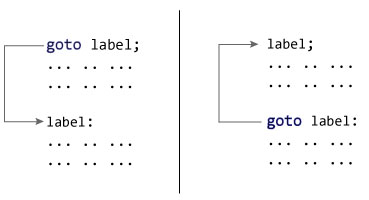
In C++ programming, goto statement is used for altering the normal sequence of program execution by transferring control to some other part of the program.

Syntax of goto Statement

goto label;
... .. ...
... .. ...
... .. ...
label: 
statement;
... .. ...
In the syntax above, label is an identifier. When goto label; is encountered, the control of program jumps to label: and executes the code below it.
Working of goto statement in C++ programming

Example: goto Statement

// This program calculates the average of numbers entered by user.
// If user enters negative number, it ignores the number and 
// calculates the average of number entered before it.

# include <iostream>
using namespace std;

int main()
{
    float num, average, sum = 0.0;
    int i, n;

    cout << "Maximum number of inputs: ";
    cin >> n;

    for(i = 1; i <= n; ++i)
    {
        cout << "Enter n" << i << ": ";
        cin >> num;
        
        if(num < 0.0)
        {
           // Control of the program move to jump:
            goto jump;
        } 
        sum += num;
    }
    
jump:
    average = sum / (i - 1);
    cout << "\nAverage = " << average;
    return 0;
}
Maximum number of inputs: 10
Enter n1: 2.3
Enter n2: 5.6
Enter n3: -5.6

Average = 3.95
You can write any C++ program without the use of goto statement and is generally considered a good idea not to use them.

Reason to Avoid goto Statement

The goto statement gives power to jump to any part of program but, makes the logic of the program complex and tangled.
In modern programming, goto statement is considered a harmful construct and a bad programming practice.
The goto statement can be replaced in most of C++ program with the use of break and continue statements.

C++ switch..case Statement

In this article, you will learn to create a switch statement in C++ programming (with an example).

he ladder if..else..if statement allows you to execute a block code among many alternatives. If you are checking on the value of a single variable in ladder if..else..if, it is better to use switch statement.
The switch statement is often faster than if...else (not always). Also, the syntax of switch statement is cleaner and easier to understand.

C++ switch...case syntax

switch (n)
​{
    case constant1:
        // code to be executed if n is equal to constant1;
        break;

    case constant2:
        // code to be executed if n is equal to constant2;
        break;
        .
        .
        .
    default:
        // code to be executed if n doesn't match any constant
}
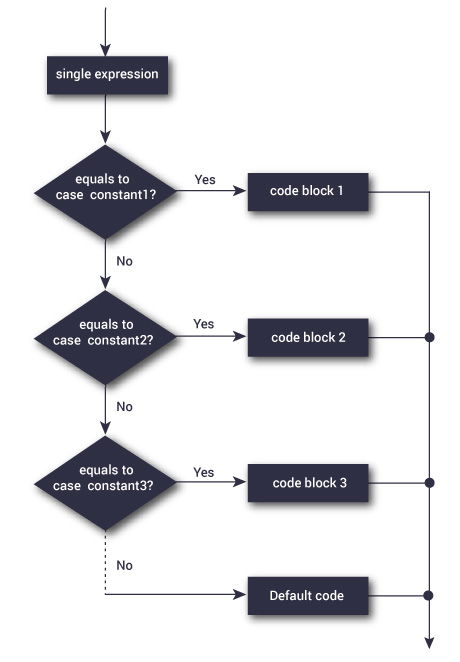
When a case constant is found that matches the switch expression, control of the program passes to the block of code associated with that case.
In the above pseudocode, suppose the value of n is equal to constant2. The compiler will execute the block of code associated with the case statement until the end of switch block, or until the break statement is encountered.
The break statement is used to prevent the code running into the next case.

Flowchart of switch Statement

Flowchart of switch case statement in C++ Programming

Example: C++ switch Statement

// Program to built a simple calculator using switch Statement

#include <iostream>
using namespace std;

int main()
{
    char o;
    float num1, num2;

    cout << "Enter an operator (+, -, *, /): ";
    cin >> o;

    cout << "Enter two operands: ";
    cin >> num1 >> num2;
    
    switch (o) 
    {
        case '+':
            cout << num1 << " + " << num2 << " = " << num1+num2;
            break;
        case '-':
            cout << num1 << " - " << num2 << " = " << num1-num2;
            break;
        case '*':
            cout << num1 << " * " << num2 << " = " << num1*num2;
            break;
        case '/':
            cout << num1 << " / " << num2 << " = " << num1/num2;
            break;
        default:
            // operator is doesn't match any case constant (+, -, *, /)
            cout << "Error! operator is not correct";
            break;
    }
    
    return 0;
}
Output
Enter an operator (+, -, *, /): +
-
Enter two operands: 2.3
4.5
2.3 - 4.5 = -2.2
The - operator entered by the user is stored in o variable. And, two operands 2.3 and 4.5 are stored in variables num1 and num2 respectively.
Then, the control of the program jumps to
cout << num1 << " - " << num2 << " = " << num1-num2;
Finally, the break statement ends the switch statement.
If break statement is not used, all cases after the correct case is executed.

C++ break and continue Statement

In this article, you'll learn about C++ statements: break and continue. More specifically, what are they, when to use them and how to use them efficiently.
In C++, there are two statements break; and continue; specifically to alter the normal flow of a program.
Sometimes, it is desirable to skip the execution of a loop for a certain test condition or terminate it immediately without checking the condition.
For example: You want to loop through data of all aged people except people aged 65. Or, you want to find the first person aged 20.
In scenarios like these, continue; or a break; statement is used.

C++ break Statement

The break; statement terminates a loop (forwhile and do..while loop) and a switch statementimmediately when it appears.

Syntax of break

break;
In real practice, break statement is almost always used inside the body of conditional statement (if...else) inside the loop.

How break statement works?

Working of break statement in C++ programming

Example 1: C++ break

C++ program to add all number entered by user until user enters 0.
// C++ Program to demonstrate working of break statement

#include <iostream>
using namespace std;
int main() {
    float number, sum = 0.0;

    // test expression is always true
    while (true)
    {
        cout << "Enter a number: ";
        cin >> number;
        
        if (number != 0.0)
        {
            sum += number;
        }
        else
        {
            // terminates the loop if number equals 0.0
            break;
        }

    }
    cout << "Sum = " << sum;

    return 0;
}
Output
Enter a number: 4
Enter a number: 3.4
Enter a number: 6.7
Enter a number: -4.5
Enter a number: 0
Sum = 9.6
The user is asked to enter a number which is stored in the variable number. If the user enters any number other than 0, the number is added to sum and stored to it.
Again, the user is asked to enter another number. When user enters 0, the test expression inside if statement is false and body of else is executed which terminates the loop.
Finally, the sum is displayed.

C++ continue Statement

It is sometimes necessary to skip a certain test condition within a loop. In such case, continue; statement is used in C++ programming.

Syntax of continue

continue;
In practice, continue; statement is almost always used inside a conditional statement.

Working of continue Statement

Working of continue statement in C++ programming

Example 2: C++ continue

C++ program to display integer from 1 to 10 except 6 and 9.
#include <iostream>
using namespace std;

int main()
{
    for (int i = 1; i <= 10; ++i)
    {
        if ( i == 6 || i == 9)
        {
            continue;
        }
        cout << i << "\t";
    }
    return 0;
}
Output
1	2	3	4	5      7	8	10	
In above program, when i is 6 or 9, execution of statement cout << i << "\t"; is skipped inside the loop using continue; statement.

C++ while and do...while Loop

In computer programming, loop repeats a certain block of code until some end condition is met.
There are 3 type of loops in C++ Programming:

C++ while Loop

The syntax of a while loop is:
while (testExpression) 
{
     // codes  
}
where, testExpression is checked on each entry of the while loop.

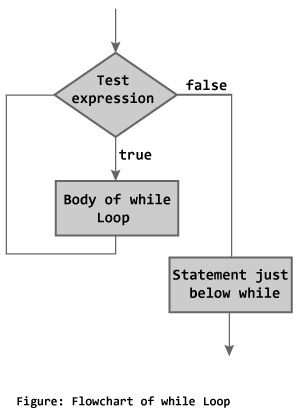
How while loop works?

  • The while loop evaluates the test expression.
  • If the test expression is true, codes inside the body of while loop is evaluated.
  • Then, the test expression is evaluated again. This process goes on until the test expression is false.
  • When the test expression is false, while loop is terminated.

Flowchart of while Loop

Flowchart of while loop in C++ Programming

Example 1: C++ while Loop

// C++ Program to compute factorial of a number
// Factorial of n = 1*2*3...*n

#include <iostream>
using namespace std;

int main() 
{
    int number, i = 1, factorial = 1;

    cout << "Enter a positive integer: ";
    cin >> number;
    
    while ( i <= number) {
        factorial *= i;      //factorial = factorial * i;
        ++i;
    }

    cout<<"Factorial of "<< number <<" = "<< factorial;
    return 0;
}
Enter a positive integer: 4
Factorial of 4 = 24
In this program, user is asked to enter a positive integer which is stored in variable number. Let's suppose, user entered 4.
Then, the while loop starts executing the code. Here's how while loop works:
  1. Initially, i = 1, test expression i <= number is true and factorial becomes 1.
  2. Variable i is updated to 2, test expression is true, factorial becomes 2.
  3. Variable i is updated to 3, test expression is true, factorial becomes 6.
  4. Variable i is updated to 4, test expression is true, factorial becomes 24.
  5. Variable i is updated to 5, test expression is false and while loop is terminated.

C++ do...while Loop

The do...while loop is a variant of the while loop with one important difference. The body of do...while loop is executed once before the test expression is checked.
The syntax of do..while loop is:
do {
   // codes;
}
while (testExpression);

How do...while loop works?

  • The codes inside the body of loop is executed at least once. Then, only the test expression is checked.
  • If the test expression is true, the body of loop is executed. This process continues until the test expression becomes false.
  • When the test expression is false, do...while loop is terminated.

Flowchart of do...while Loop

Flowchart of do while loop in C++ programming

Example 2: C++ do...while Loop

// C++ program to add numbers until user enters 0

#include <iostream>
using namespace std;

int main() 
{
    float number, sum = 0.0;
    
    do {
        cout<<"Enter a number: ";
        cin>>number;
        sum += number;
    }
    while(number != 0.0);

    cout<<"Total sum = "<<sum;
    
    return 0;
}
Output
Enter a number: 2
Enter a number: 3
Enter a number: 4
Enter a number: -4
Enter a number: 2
Enter a number: 4.4
Enter a number: 2
Enter a number: 0

C++ for Loop

Loops are used in programming to repeat a specific block of code. In this tutorial, you will learn to create a for loop in C++ programming (with examples).

Loops are used in programming to repeat a specific block until some end condition is met. There are three type of loops in C++ programming:
  1. for loop
  2. while loop
  3. do...while loop

C++ for Loop Syntax

for(initializationStatement; testExpression; updateStatement) {
    // codes 
}
where, only testExpression is mandatory.

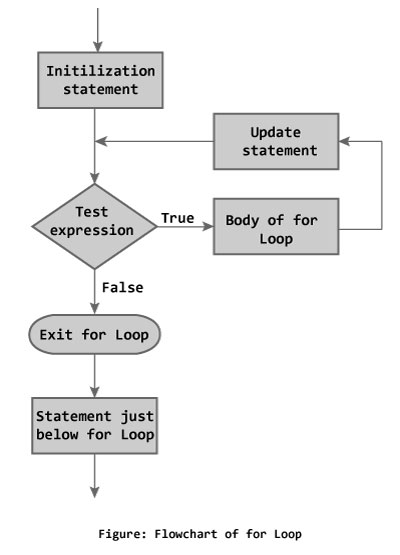
How for loop works?

  1. The initialization statement is executed only once at the beginning.
  2. Then, the test expression is evaluated.
  3. If the test expression is false, for loop is terminated. But if the test expression is true, codes inside body of for loop is executed and update expression is updated.
  4. Again, the test expression is evaluated and this process repeats until the test expression is false.

Flowchart of for Loop in C++

Flowchart of for loop in C++ Programming

Example 1: C++ for Loop

// C++ Program to find factorial of a number
// Factorial on n = 1*2*3*...*n

#include <iostream>
using namespace std;

int main() 
{
    int i, n, factorial = 1;

    cout << "Enter a positive integer: ";
    cin >> n;

    for (i = 1; i <= n; ++i) {
        factorial *= i;   // factorial = factorial * i;
    }

    cout<< "Factorial of "<<n<<" = "<<factorial;
    return 0;
}
Enter a positive integer: 5
Factorial of 5 = 120
In the program, user is asked to enter a positive integer which is stored in variable n(suppose user entered 5). Here is the working of for loop:
  1. Initially, i is equal to 1, test expression is true, factorial becomes 1.
  2. i is updated to 2, test expression is true, factorial becomes 2.
  3. i is updated to 3, test expression is true, factorial becomes 6.
  4. i is updated to 4, test expression is true, factorial becomes 24.
  5. i is updated to 5, test expression is true, factorial becomes 120.
  6. i is updated to 6, test expression is false, for loop is terminated.
In the above program, variable i is not used outside of the for loop. In such cases, it is better to declare the variable in for loop (at initialization statement).
#include <iostream>
using namespace std;

int main() 
{
    int n, factorial = 1;

    cout << "Enter a positive integer: ";
    cin >> n;

    for (int i = 1; i <= n; ++i) {
        factorial *= i;   // factorial = factorial * i;
    }

    cout<< "Factorial of "<<n<<" = "<<factorial;
    return 0;
}

Popular Posts