Showing posts with label CPP OBJECT AND CLASS. Show all posts

Tuesday, October 23, 2018

C++ Classes and Objects

C++ Classes and Objects

In this article, you will learn to work with objects and classes in C++ programming.
C++ is a multi-paradigm programming language. Meaning, it supports different programming styles.
One of the popular ways to solve a programming problem is by creating objects, known as object-oriented style of programming.
C++ supports object-oriented (OO) style of programming which allows you to divide complex problems into smaller sets by creating objects.
Object is simply a collection of data and functions that act on those data.

C++ Class

Before you create an object in C++, you need to define a class.
A class is a blueprint for the object.
We can think of class as a sketch (prototype) of a house. It contains all the details about the floors, doors, windows etc. Based on these descriptions we build the house. House is the object.
As, many houses can be made from the same description, we can create many objects from a class.

How to define a class in C++?

A class is defined in C++ using keyword class followed by the name of class.
The body of class is defined inside the curly brackets and terminated by a semicolon at the end.
class className
   {
   // some data
   // some functions
   };

Example: Class in C++

class Test
{
    private:
        int data1;
        float data2;  

    public:  
        void function1()
        {   data1 = 2;  } 

        float function2()
        { 
            data2 = 3.5;
            return data2;
        }
   };
Here, we defined a class named Test.
This class has two data members: data1and data2 and two member functions: function1() and function2().

Keywords: private and public

You may have noticed two keywords: private and public in the above example.
The private keyword makes data and functions private. Private data and functions can be accessed only from inside the same class.
The public keyword makes data and functions public. Public data and functions can be accessed out of the class.
Here, data1 and data2 are private members where as function1() and function2() are public members.
If you try to access private data from outside of the class, compiler throws error. This feature in OOP is known as data hiding.

C++ Objects

When class is defined, only the specification for the object is defined; no memory or storage is allocated.
To use the data and access functions defined in the class, you need to create objects.

Syntax to Define Object in C++

className objectVariableName;
You can create objects of Test class (defined in above example) as follows:

class Test
{
    private:
        int data1;
        float data2;  

    public:  
        void function1()
        {   data1 = 2;  } 

        float function2()
        { 
            data2 = 3.5;
            return data2;
        }
   };

int main()
{
    Test o1, o2;
}
Here, two objects o1 and o2 of Testclass are created.
In the above class Testdata1 and data2are data members and function1() and function2() are member functions.

How to access data member and member function in C++?

You can access the data members and member functions by using a . (dot) operator. For example,
o2.function1();
This will call the function1() function inside the Test class for objects o2.
Similarly, the data member can be accessed as:
o1.data2 = 5.5;
It is important to note that, the private members can be accessed only from inside the class.
So, you can use o2.function1(); from any function or class in the above example. However, the code o1.data2 = 5.5; should always be inside the class Test.

Example: Object and Class in C++ Programming

// Program to illustrate the working of objects and class in C++ Programming
#include <iostream>
using namespace std;

class Test
{
    private:
        int data1;
        float data2;

    public:
       
       void insertIntegerData(int d)
       {
          data1 = d;
          cout << "Number: " << data1;
        }

       float insertFloatData()
       {
           cout << "\nEnter data: ";
           cin >> data2;
           return data2;
        }
};

 int main()
 {
      Test o1, o2;
      float secondDataOfObject2;

      o1.insertIntegerData(12);
      secondDataOfObject2 = o2.insertFloatData();

      cout << "You entered " << secondDataOfObject2;
      return 0;
 }
Output
Number: 12
Enter data: 23.3
You entered 23.3
In this program, two data members data1and data2 and two member functions insertIntegerData() and insertFloatData() are defined under Test class.
Two objects o1 and o2 of the same class are declared.
The insertIntegerData() function is called for the o1 object using:
o1.insertIntegerData(12);
This sets the value of data1 for object o1to 12.
Then, the insertFloatData() function for object o2 is called and the return value from the function is stored in variable secondDataOfObject2 using:
secondDataOfObject2 = o2.insertFloatData();
In this program, data2 of o1 and data1of o2 are not used and contains garbage value.

C++ Constructors

C++ Constructors

In this article, you'll learn about constructors in C++. You'll learn what is a constructor, how to create it and types of constructors in C++.
A constructor is a special type of member function that initialises an object automatically when it is created.
Compiler identifies a given member function is a constructor by its name and the return type.
Constructor has the same name as that of the class and it does not have any return type. Also, the constructor is always public.
... .. ...
class temporary
{
private: 
 int x;
 float y;
public:
 // Constructor
 temporary(): x(5), y(5.5)
 {
  // Body of constructor
 }
 ... ..  ...
};

int main()
{
 Temporary t1;
 ... .. ...
}
Above program shows a constructor is defined without a return type and the same name as the class.

How constructor works?

In the above pseudo code, temporary() is a constructor.
When an object of class temporary is created, the constructor is called automatically, and x is initialized to 5 and y is initialized to 5.5.
You can also initialise the data members inside the constructor's body as below. However, this method is not preferred.
temporary()
{
   x = 5;
   y = 5.5;
}
// This method is not preferred.

Use of Constructor in C++

Suppose you are working on 100's of Person objects and the default value of a data member age is 0. Initialising all objects manually will be a very tedious task.
Instead, you can define a constructor that initialises age to 0. Then, all you have to do is create a Person object and the constructor will automatically initialise the age.
These situations arise frequently while handling array of objects.
Also, if you want to execute some code immediately after an object is created, you can place the code inside the body of the constructor.

Example 1: Constructor in C++

Calculate the area of a rectangle and display it.
#include <iostream>
using namespace std;

class Area
{
    private:
       int length;
       int breadth;

    public:
       // Constructor
       Area(): length(5), breadth(2){ }

       void GetLength()
       {
           cout << "Enter length and breadth respectively: ";
           cin >> length >> breadth;
       }

       int AreaCalculation() {  return (length * breadth);  }

       void DisplayArea(int temp)
       {
           cout << "Area: " << temp;
       }
};

int main()
{
    Area A1, A2;
    int temp;

    A1.GetLength();
    temp = A1.AreaCalculation();
    A1.DisplayArea(temp);

    cout << endl << "Default Area when value is not taken from user" << endl;

    temp = A2.AreaCalculation();
    A2.DisplayArea(temp);

    return 0;
}
In this program, class Area is created to handle area related functionalities. It has two data members length and breadth.
A constructor is defined which initialises length to 5 and breadth to 2.
We also have three additional member functions GetLength(), AreaCalculation() and DisplayArea() to get length from the user, calculate the area and display the area respectively.
When, objects A1 and A2 are created, the length and breadth of both objects are initialized to 5 and 2 respectively, because of the constructor.
Then, the member function GetLength() is invoked which takes the value of lengthand breadth from the user for object A1. This changes the length and breadth of the object A1.
Then, the area for the object A1 is calculated and stored in variable temp by calling AreaCalculation() function and finally, it is displayed.
For object A2, no data is asked from the user. So, the length and breadth remains 5 and 2 respectively.
Then, the area for A2 is calculated and displayed which is 10.
Output
Enter length and breadth respectively: 6
7
Area: 42
Default Area when value is not taken from user
Area: 10

Constructor Overloading

Constructor can be overloaded in a similar way as function overloading.
Overloaded constructors have the same name (name of the class) but different number of arguments.
Depending upon the number and type of arguments passed, specific constructor is called.
Since, there are multiple constructors present, argument to the constructor should also be passed while creating an object.

Example 2: Constructor overloading

// Source Code to demonstrate the working of overloaded constructors
#include <iostream>
using namespace std;

class Area
{
    private:
       int length;
       int breadth;

    public:
       // Constructor with no arguments
       Area(): length(5), breadth(2) { }

       // Constructor with two arguments
       Area(int l, int b): length(l), breadth(b){ }

       void GetLength()
       {
           cout << "Enter length and breadth respectively: ";
           cin >> length >> breadth;
       }

       int AreaCalculation() {  return length * breadth;  }

       void DisplayArea(int temp)
       {
           cout << "Area: " << temp << endl;
       }
};

int main()
{
    Area A1, A2(2, 1);
    int temp;

    cout << "Default Area when no argument is passed." << endl;
    temp = A1.AreaCalculation();
    A1.DisplayArea(temp);

    cout << "Area when (2,1) is passed as argument." << endl;
    temp = A2.AreaCalculation();
    A2.DisplayArea(temp);

    return 0;
}
For object A1, no argument is passed while creating the object.
Thus, the constructor with no argument is invoked which initialises length to 5 and breadth to 2. Hence, area of the object A1 will be 10.
For object A2, 2 and 1 are passed as arguments while creating the object.
Thus, the constructor with two arguments is invoked which initialises length to l (2 in this case) and breadth to b (1 in this case). Hence, area of the object A2 will be 2.
Output
Default Area when no argument is passed.
Area: 10
Area when (2,1) is passed as argument.
Area: 2

Default Copy Constructor

An object can be initialized with another object of same type. This is same as copying the contents of a class to another class.
In the above program, if you want to initialise an object A3 so that it contains same values as A2, this can be performed as:
....
int main()
{
   Area A1, A2(2, 1);

   // Copies the content of A2 to A3
   Area A3(A2);
     OR, 
   Area A3 = A2;
}
You might think, you need to create a new constructor to perform this task. But, no additional constructor is needed. This is because the copy constructor is already built into all classes by default.

Monday, October 22, 2018

C++ OPERATOR OVERLOADING

C++ Operator Overloading

In C++, it's possible to change the way operator works (for user-defined types). In this article, you will learn to implement operator overloading feature.
Operator overloading in C++
The meaning of an operator is always same for variable of basic types like: int, float, double etc. For example: To add two integers, + operator is used.
However, for user-defined types (like: objects), you can redefine the way operator works. For example:
If there are two objects of a class that contains string as its data members. You can redefine the meaning of + operator and use it to concatenate those strings.
This feature in C++ programming that allows programmer to redefine the meaning of an operator (when they operate on class objects) is known as operator overloading.

Why is operator overloading used?

You can write any C++ program without the knowledge of operator overloading. However, operator operating are profoundly used by programmers to make program intuitive. For example,
You can replace the code like:
calculation = add(multiply(a, b),divide(a, b));
to
calculation = (a*b)+(a/b);

How to overload operators in C++ programming?

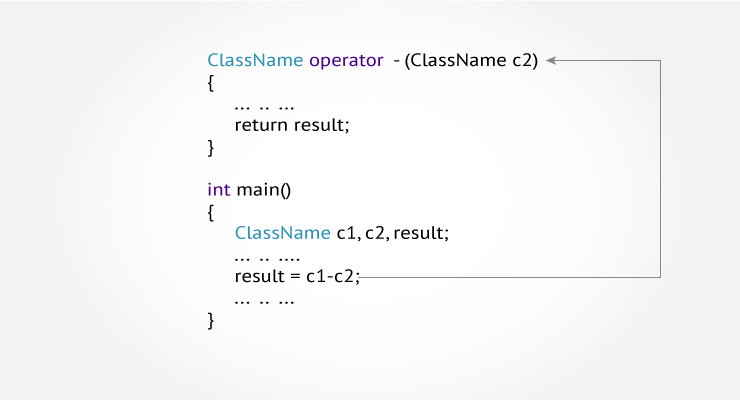
To overload an operator, a special operator function is defined inside the class as:
class className
{
    ... .. ...
    public
       returnType operator symbol (arguments)
       {
           ... .. ...
       } 
    ... .. ...
};
  • Here, returnType is the return type of the function.
  • The returnType of the function is followed by operator keyword.
  • Symbol is the operator symbol you want to overload. Like: +, <, -, ++
  • You can pass arguments to the operator function in similar way as functions.

Example: Operator overloading in C++ Programming

#include <iostream>
using namespace std;

class Test
{
   private:
      int count;

   public:
       Test(): count(5){}

       void operator ++() 
       { 
          count = count+1; 
       }
       void Display() { cout<<"Count: "<<count; }
};

int main()
{
    Test t;
    // this calls "function void operator ++()" function
    ++t;    
    t.Display();
    return 0;
}
Count: 6
This function is called when ++ operator operates on the object of Test class (object t in this case).
In the program,void operator ++ () operator function is defined (inside Test class).
This function increments the value of count by 1 for t object.

Things to remember

  1. Operator overloading allows you to redefine the way operator works for user-defined types only (objects, structures). It cannot be used for built-in types (int, float, char etc.).
  2. Two operators = and & are already overloaded by default in C++. For example: To copy objects of same class, you can directly use = operator. You do not need to create an operator function.
  3. Operator overloading cannot change the precedence and associatively of operators. However, if you want to change the order of evaluation, parenthesis should be used.
  4. There are 4 operators that cannot be overloaded in C++. They are :: (scope resolution), . (member selection), .*(member selection through pointer to function) and ?: (ternary operator).

Following best practices while using operator overloading

Operator overloading allows you to define the way operator works (the way you want).
In the above example, ++ operator operates on object to increase the value of data member count by 1.
void operator ++() 
    { 
        count = count+1; 
    }
However, if you use the following code. It decreases the value of count by 100 when ++ operator is used.
void operator ++() 
    { 
        count = count-100; 
    }
This may be technically correct. But, this code is confusing and, difficult to understand and debug.
It's your job as a programmer to use operator overloading properly and in consistent way.

In the above example, the value of countincreases by 1 when ++ operator is used. However, this program is incomplete in sense that you cannot use code like:
t1 = ++t
It is because the return type of the operator function is void.

Popular Posts