Showing posts with label CPP POINTERS. Show all posts

Monday, October 22, 2018

C++ MEMORY MANAGEMENT

C++ Memory Management: new and delete

In this article, you'll learn to manage memory effectively in C++ using new and delete operations.
Arrays can be used to store multiple homogenous data but there are serious drawbacks of using arrays.
You should allocate the memory of an array when you declare it but most of the time, the exact memory needed cannot be determined until runtime.
The best thing to do in this situation is to declare an array with maximum possible memory required (declare array with maximum possible size expected).
The downside to this is unused memory is wasted and cannot be used by any other programs.
To avoid wastage of memory, you can dynamically allocate memory required during runtime using new and deleteoperator in C++.

Example 1: C++ Memory Management

C++ Program to store GPA of n number of students and display it where n is the number of students entered by user.
#include <iostream>
#include <cstring>
using namespace std;

int main()
{
    int num;
    cout << "Enter total number of students: ";
    cin >> num;
    float* ptr;
    
    // memory allocation of num number of floats
    ptr = new float[num];

    cout << "Enter GPA of students." << endl;
    for (int i = 0; i < num; ++i)
    {
        cout << "Student" << i + 1 << ": ";
        cin >> *(ptr + i);
    }

    cout << "\nDisplaying GPA of students." << endl;
    for (int i = 0; i < num; ++i) {
        cout << "Student" << i + 1 << " :" << *(ptr + i) << endl;
    }

    // ptr memory is released
    delete [] ptr;

    return 0;
}
Enter total number of students: 4
Enter GPA of students.
Student1: 3.6
Student2: 3.1
Student3: 3.9
Student4: 2.9

Displaying GPA of students.
Student1 :3.6
Student2 :3.1
Student3 :3.9
Student4 :2.9
In this program, only the memory required to store num (entered by user) number of floating-point data is declared dynamically.

The new Operator

ptr = new float[num];
This expression in the above program returns a pointer to a section of memory just large enough to hold the numnumber of floating-point data.

The delete Operator

Once the memory is allocated using newoperator, it should released back to the operating system.
If the program uses a large amount of memory using new, system may crash because there will be no memory available for the operating system.
The following expression returns memory back to the operating system.
delete [] ptr;
The brackets [] indicates the array has been deleted. If you need to delete a single object then, you don't need to use brackets.
delete ptr;

Example 2: C++ Memory Management

Object-oriented approach to handle above program in C++.
#include <iostream>
using namespace std;

class Test
{
private:
    int num;
    float *ptr;

public:
    Test()
    {
        cout << "Enter total number of students: ";
        cin >> num;
        
        ptr = new float[num];
        
        cout << "Enter GPA of students." << endl;
        for (int i = 0; i < num; ++i)
        {
            cout << "Student" << i + 1 << ": ";
            cin >> *(ptr + i);
        }
    }
    
    ~Test() {
        delete[] ptr;
    }

    void Display() {
        cout << "\nDisplaying GPA of students." << endl;
        for (int i = 0; i < num; ++i) {
            cout << "Student" << i+1 << " :" << *(ptr + i) << endl;
        }
    }
    
};
int main() {
    Test s;
    s.Display();
    return 0;
}
The output of this program is same as the above program.
When the object s is created, the constructor is called which allocates the memory for num floating-point data.
When the object is destroyed, i.e, when the object goes out of scope, destructor is automatically called.
    ~Test() {
        delete[] ptr;
    }
This destructor executes delete[] ptr; and returns memory back to the operating system.
C++ POINTERS AND FUNCTIONS

C++ Call by Reference: Using pointers [With Examples]


In this article, you'll learn to pass pointers as an argument to the function, and use it efficiently in your program.


In C++ Functions article, you learned about passing arguments to a function. This method used is called passing by value because the actual value is passed.
However, there is another way of passing an argument to a function where where the actual value of the argument is not passed. Instead, only the reference to that value is passed.

Example 1: Passing by reference without pointers

#include <iostream>
using namespace std;

// Function prototype
void swap(int&, int&);

int main()
{
    int a = 1, b = 2;
    cout << "Before swapping" << endl;
    cout << "a = " << a << endl;
    cout << "b = " << b << endl;

    swap(a, b);

    cout << "\nAfter swapping" << endl;
    cout << "a = " << a << endl;
    cout << "b = " << b << endl;

    return 0;
}

void swap(int& n1, int& n2) {
    int temp;
    temp = n1;
    n1 = n2;
    n2 = temp;
}
Output
Before swapping
a = 1
b = 2

After swapping
a = 2
b = 1
In main(), two integer variables a and bare defined. And those integers are passed to a function swap() by reference.
Only the reference (address) of the variables a and b are received in the swap() function and swapping takes place in the original address of the variables.
In the swap() function, n1 and n2 are formal arguments which are actually same as variables a and b respectively.
There is another way of doing this same exact task using pointers.

Example 2: Passing by reference using pointers

#include <iostream>
using namespace std;

// Function prototype
void swap(int*, int*);

int main()
{
    int a = 1, b = 2;
    cout << "Before swapping" << endl;
    cout << "a = " << a << endl;
    cout << "b = " << b << endl;

    swap(&a, &b);

    cout << "\nAfter swapping" << endl;
    cout << "a = " << a << endl;
    cout << "b = " << b << endl;
    return 0;
}

void swap(int* n1, int* n2) {
    int temp;
    temp = *n1;
    *n1 = *n2;
    *n2 = temp;
}
The output of this example is same as before.
In this case, the address of variable is passed during function call rather than the variable itself.
swap(&a, &b); // &a is address of a and &b is address of b
Since the address is passed instead of value, dereference operator must be used to access the value stored in that address.
void swap(int* n1, int* n2) { 
 ... .. ...
}
The *n1 and *n2 gives the value stored at address n1 and n2 respectively.
Since n1 contains the address of a, anything done to *n1 changes the value of a in main() function as well. Similarly, b will have same value as *n2.

C++ Pointers and Arrays

C++ Pointers and Arrays

In this article, you'll learn about the relation between arrays and pointers, and use them efficiently in your program.
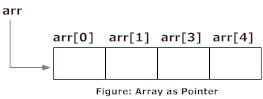
Pointers are the variables that hold address. Not only can pointers store address of a single variable, it can also store address of cells of an array.
Consider this example:
int* ptr;
int a[5];
ptr = &a[2];  // &a[2] is the address of third element of a[5].
Pointer pointing to an array cell
Suppose, pointer needs to point to the fourth element of an array, that is, hold address of fourth array element in above case.
Since ptr points to the third element in the above example, ptr + 1 will point to the fourth element.
You may think, ptr + 1 gives you the address of next byte to the ptr. But it's not correct.
This is because pointer ptr is a pointer to an int and size of int is fixed for a operating system (size of int is 4 byte of 64-bit operating system). Hence, the address between ptr and ptr + 1 differs by 4 bytes.
If pointer ptr was pointer to char then, the address between ptr and ptr + 1would have differed by 1 byte since size of a character is 1 byte.

Example 1: C++ Pointers and Arrays

C++ Program to display address of elements of an array using both array and pointers
#include <iostream>
using namespace std;

int main()
{
    float arr[5];
    float *ptr;
    
    cout << "Displaying address using arrays: " << endl;
    for (int i = 0; i < 5; ++i)
    {
        cout << "&arr[" << i << "] = " << &arr[i] << endl;
    }

    // ptr = &arr[0]
    ptr = arr;

    cout<<"\nDisplaying address using pointers: "<< endl;
    for (int i = 0; i < 5; ++i)
    {
        cout << "ptr + " << i << " = "<< ptr + i << endl;
    }

    return 0;
}
Output
Displaying address using arrays: 
&arr[0] = 0x7fff5fbff880
&arr[1] = 0x7fff5fbff884
&arr[2] = 0x7fff5fbff888
&arr[3] = 0x7fff5fbff88c
&arr[4] = 0x7fff5fbff890

Displaying address using pointers: 
ptr + 0 = 0x7fff5fbff880
ptr + 1 = 0x7fff5fbff884
ptr + 2 = 0x7fff5fbff888
ptr + 3 = 0x7fff5fbff88c
ptr + 4 = 0x7fff5fbff890
But, array elements can be accessed using pointer notation by using same array name arr. For example:
int arr[3];

&arr[0] is equivalent to arr
&arr[1] is equivalent to arr + 1
&arr[2] is equivalen to arr + 2

Example 2: Pointer and Arrays

C++ Program to display address of array elements using pointer notation.
#include <iostream>
using namespace std;

int main() {
    float arr[5];
    
    cout<<"Displaying address using pointers notation: "<< endl;
    for (int i = 0; i < 5; ++i) {
        cout << arr + i <<endl;
    }

    return 0;
}
Output
Displaying address using pointers notation: 
0x7fff5fbff8a0
0x7fff5fbff8a4
0x7fff5fbff8a8
0x7fff5fbff8ac
0x7fff5fbff8b0
You know that, pointer ptr holds the address and expression *ptr gives the value stored in the address.
Similarly, you can get the value stored in the pointer ptr + 1 using *(ptr + 1).
Consider this code below:
int ptr[5] = {3, 4, 5, 5, 3};
  • &ptr[0] is equal to ptr and *ptr is equal to ptr[0]
  • &ptr[1] is equal to ptr + 1 and *(ptr + 1) is equal to ptr[1]
  • &ptr[2] is equal to ptr + 2 and *(ptr + 2) is equal to ptr[2]
  • &ptr[i] is equal to ptr + i and *(ptr + i) is equal to ptr[i]

Example 3: C++ Pointer and Array

C++ Program to insert and display data entered by using pointer notation.
#include <iostream>
using namespace std;

int main() {
    float arr[5];
    
   // Inserting data using pointer notation
    cout << "Enter 5 numbers: ";
    for (int i = 0; i < 5; ++i) {
        cin >> *(arr + i) ;
    }

    // Displaying data using pointer notation
    cout << "Displaying data: " << endl;
    for (int i = 0; i < 5; ++i) {
        cout << *(arr + i) << endl ;
    }

    return 0;
}
Output
Enter 5 numbers: 2.5
3.5
4.5
5
2
Displaying data: 
2.5
3.5
4.5
5
2

Popular Posts