Showing posts with label c programming. Show all posts

Saturday, October 20, 2018

C switch...case Statement

In this tutorial, you will learn to write a switch statement in C programming (with an example).
The if..else..if ladder allows you to execute a block code among many alternatives. If you are checking on the value of a single variable in if...else...if, it is better to use switch statement.
The switch statement is often faster than nested if...else (not always). Also, the syntax of switch statement is cleaner and easy to understand.

Syntax of switch...case

switch (n)
​{
    case constant1:
        // code to be executed if n is equal to constant1;
        break;

    case constant2:
        // code to be executed if n is equal to constant2;
        break;
        .
        .
        .
    default:
        // code to be executed if n doesn't match any constant
}
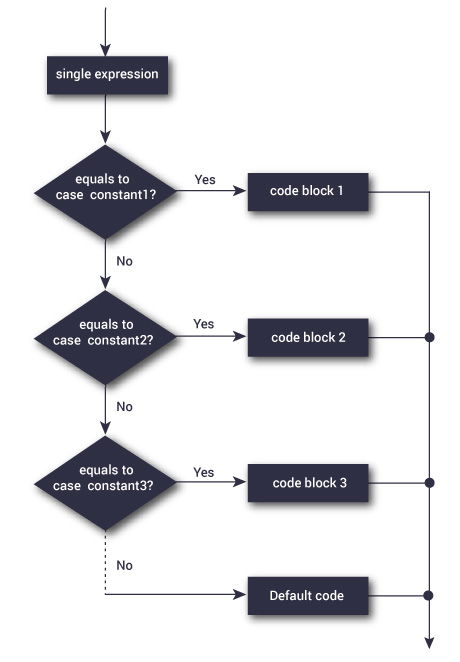
When a case constant is found that matches the switch expression, control of the program passes to the block of code associated with that case.
In the above pseudocode, suppose the value of n is equal to constant2. The compiler will execute the block of code associate with the case statement until the end of switch block, or until the break statement is encountered.
The break statement is used to prevent the code running into the next case.

switch Statement Flowchart

Flowchart of switch statement

Example: switch Statement

// Program to create a simple calculator
// Performs addition, subtraction, multiplication or division depending the input from user

# include <stdio.h>

int main() {

    char operator;
    double firstNumber,secondNumber;

    printf("Enter an operator (+, -, *, /): ");
    scanf("%c", &operator);

    printf("Enter two operands: ");
    scanf("%lf %lf",&firstNumber, &secondNumber);

    switch(operator)
    {
        case '+':
            printf("%.1lf + %.1lf = %.1lf",firstNumber, secondNumber, firstNumber+secondNumber);
            break;

        case '-':
            printf("%.1lf - %.1lf = %.1lf",firstNumber, secondNumber, firstNumber-secondNumber);
            break;

        case '*':
            printf("%.1lf * %.1lf = %.1lf",firstNumber, secondNumber, firstNumber*secondNumber);
            break;

        case '/':
            printf("%.1lf / %.1lf = %.1lf",firstNumber, secondNumber, firstNumber/secondNumber);
            break;

        // operator is doesn't match any case constant (+, -, *, /)
        default:
            printf("Error! operator is not correct");
    }

    return 0;
}
Output
Enter an operator (+, -, *,): -
Enter two operands: 32.5
12.4
32.5 - 12.4 = 20.1
Then, control of the program jumps to
printf("%.1lf / %.1lf = %.1lf",firstNumber, secondNumber, firstNumber/firstNumber);
Finally, the break statement ends the switch statement.
If break statement is not used, all cases after the correct case is executed. 

C programming functions

In this tutorial, you will be introduced to functions (both user-defined and standard library functions) in C programming. Also, you will learn why functions are used in programming.
A function is a block of code that performs a specific task.
Suppose, a program related to graphics needs to create a circle and color it depending upon the radius and color from the user. You can create two functions to solve this problem:
  • create a circle function
  • color function
Dividing complex problem into small components makes program easy to understand and use.

Types of functions in C programming

Depending on whether a function is defined by the user or already included in C compilers, there are two types of functions in C programming
There are two types of functions in C programming:
  • Standard library functions
  • User defined functions

Standard library functions

The standard library functions are built-in functions in C programming to handle tasks such as mathematical computations, I/O processing, string handling etc.
These functions are defined in the header file. When you include the header file, these functions are available for use. For example:
The printf() is a standard library function to send formatted output to the screen (display output on the screen). This function is defined in "stdio.h" header file.
There are other numerous library functions defined under "stdio.h", such as scanf()fprintf()getchar() etc. Once you include "stdio.h" in your program, all these functions are available for use.
Visit this page to learn more about standard library functions in C programming.

User-defined functions

As mentioned earlier, C allow programmers to define functions. Such functions created by the user are called user-defined functions.
Depending upon the complexity and requirement of the program, you can create as many user-defined functions as you want.

How user-defined function works?

#include <stdio.h>
void functionName()
{
    ... .. ...
    ... .. ...
}

int main()
{
    ... .. ...
    ... .. ...

    functionName();
    
    ... .. ...
    ... .. ...
}
The execution of a C program begins from the main() function.

C Language Introduction


C Language Introduction

C is a procedural programming language. It was initially developed by Dennis Ritchie between 1969 and 1973. It was mainly developed as a system programming language to write operating system. The main features of C language include low-level access to memory, simple set of keywords, and clean style, these features make C language suitable for system programming like operating system or compiler development.
Many later languages have borrowed syntax/features directly or indirectly from C language. Like syntax of Java, PHP, JavaScript and many other languages is mainly based on C language. C++ is nearly a superset of C language (There are few programs that may compile in C, but not in C++).
Beginning with C programming:
1) Finding a Compiler:
Before we start C programming, we need to have a compiler to compile and run our programs. There are certain online compilers like or that can be used to start C without installing a compiler.
Windows: There are many compilers available freely for compilation of C programs like Code Blocks  and Dev-CPP.   We strongly recommend Code Blocks.
Linux: For Linux, gcc comes bundled with the linux,  Code Blocks can also be used with Linux.
2) Writing first program:
Following is first program in C
#include <stdio.h>
int main(void)
{
    printf("rexprogramming");
    return 0;
}

Output:

Rexprogramming
Let us analyze the program line by line.
Line 1: [ #include <stdio.h> ] In a C program, all lines that start with are processed by preprocessor which is a program invoked by the compiler. In a very basic term, preprocessor takes a C program and produces another C program. The produced program has no lines starting with #, all such lines are processed by the preprocessor. In the above example, preprocessor copies the preprocessed code of stdio.h to our file. The .h files are called header files in C. These header files generally contain declaration of functions. We need stdio.h for the function printf() used in the program.
Line 2 [ int main(void) ] There must to be starting point from where execution of compiled C program begins. In C, the execution typically begins with first line of main(). The void written in brackets indicates that the main doesn’t take any parameter (See this for more details). main() can be written to take parameters also. We will be covering that in future posts.
The int written before main indicates return type of main(). The value returned by main indicates status of program termination. See this post for more details on return type.
Line 3 and 6: [ { and } ] In C language, a pair of curly brackets define a scope and mainly used in functions and control statements like if, else, loops. All functions must start and end with curly brackets.
Line 4 [ printf(“rexprogramming”); ] printf() is a standard library function to print something on standard output. The semicolon at the end of printf indicates line termination. In C, semicolon is always used to indicate end of statement.
Line 5 [ return 0; ] The return statement returns the value from main(). The returned value may be used by operating system to know termination status of your program. The value 0 typically means successful termination.
Please write comments if you find anything incorrect, or you want to share more information about the topic discussed above


C programming while loop,do..while loop and for loop

Loops are used in programming to repeat a specific block of code. After reading this tutorial, you will learn how to create a while and do...while loop in C programming.
Loops are used in programming to repeat a specific block until some end condition is met. There are three loops in C programming:
  1. for loop
  2. while loop
  3. do...while loop

while loop

The syntax of a while loop is:
while (testExpression) 
{
    //codes 
}
where, testExpression checks the condition is true or false before each loop.

How while loop works?

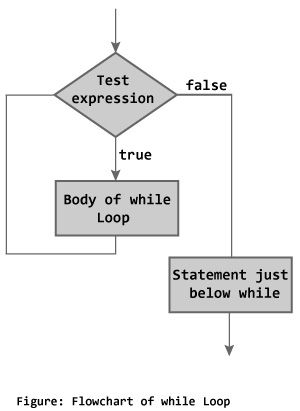
The while loop evaluates the test expression.
If the test expression is true (nonzero), codes inside the body of while loop are exectued. The test expression is evaluated again. The process goes on until the test expression is false.
When the test expression is false, the while loop is terminated.

Flowchart of while loop

flowchart of while loop in C programming

Example #1: while loop

// Program to find factorial of a number
// For a positive integer n, factorial = 1*2*3...n

#include <stdio.h>
int main()
{
    int number;
    long long factorial;

    printf("Enter an integer: ");
    scanf("%d",&number);

    factorial = 1;

    // loop terminates when number is less than or equal to 0
    while (number > 0)
    {
        factorial *= number;  // factorial = factorial*number;
        --number;
    }

    printf("Factorial= %lld", factorial);

    return 0;
}
Enter an integer: 5
Factorial = 120
To learn more on test expression (when test expression is evaluated to nonzero (true) and 0 (false)), check out relationaland logical operators.

do...while loop

The do..while loop is similar to the whileloop with one important difference. The body of do...while loop is executed once, before checking the test expression. Hence, the do...while loop is executed at least once.

do...while loop Syntax

do
{
   // codes
}
while (testExpression);

How do...while loop works?

The code block (loop body) inside the braces is executed once.
Then, the test expression is evaluated. If the test expression is true, the loop body is executed again. This process goes on until the test expression is evaluated to 0 (false).
When the test expression is false (nonzero), the do...while loop is terminated.
do while loop flowchart in C programming

Example #2: do...while loop

// Program to add numbers until user enters zero

#include <stdio.h>
int main()
{
    double number, sum = 0;

    // loop body is executed at least once
    do
    {
        printf("Enter a number: ");
        scanf("%lf", &number);
        sum += number;
    }
    while(number != 0.0);

    printf("Sum = %.2lf",sum);

    return 0;
}
Output
Enter a number: 1.5
Enter a number: 2.4
Enter a number: -3.4
Enter a number: 4.2
Enter a number: 0
Sum = 4.70
To learn more on test expression (when test expression is evaluated to nonzero (true) and 0 (false)), check out relationaland logical operators.

for Loop

 The syntax of for loop is:
for (initializationStatement; testExpression; updateStatement)
{
       // codes 
}

How for loop works?

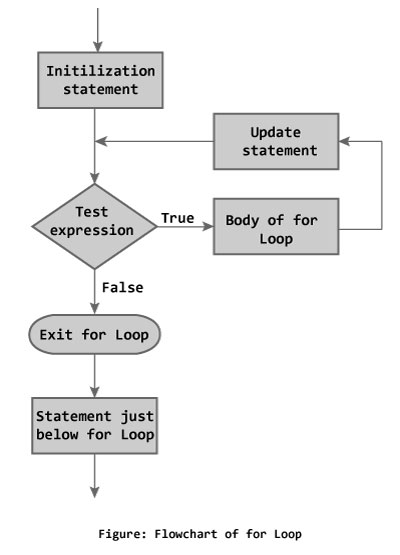
The initialization statement is executed only once.
Then, the test expression is evaluated. If the test expression is false (0), for loop is terminated. But if the test expression is true (nonzero), codes inside the body of for loop is executed and the update expression is updated.
This process repeats until the test expression is false.
The for loop is commonly used when the number of iterations is known.
To learn more on test expression (when test expression is evaluated to nonzero (true) and 0 (false)), check out relational and logical operators.

for loop Flowchart

// Program to calculate the sum of first n natural numbers
// Positive integers 1,2,3...n are known as natural numbers

#include <stdio.h>
int main()
{
    int num, count, sum = 0;

    printf("Enter a positive integer: ");
    scanf("%d", &num);

    // for loop terminates when n is less than count
    for(count = 1; count <= num; ++count)
    {
        sum += count;
    }

    printf("Sum = %d", sum);

    return 0;
}
Output
Enter a positive integer: 10
Sum = 55
The value entered by the user is stored in variable num. Suppose, the user entered 10.
The count is initialized to 1 and the test expression is evaluated. Since, the test expression count <= num (1 less than or equal to 10) is true, the body of for loop is executed and the value of sum will equal to 1.
Then, the update statement ++count is executed and count will equal to 2. Again, the test expression is evaluated. Since, 2 is also less than 10, the test expression is evaluated to true and the body of for loop is executed. Now, the sum will equal 3.
This process goes on and the sum is calculated until the count reaches 11.
When the count is 11,  the test expression is evaluated to 0 (false) as 11 is not less than or equal to 10. Therefore, the loop terminates and next, the total sum is printed.

Popular Posts