Showing posts with label CPP FUNCTION. Show all posts

Monday, October 22, 2018

C++ Storage Class

In this article, you'll learn about different storage classes in C++. Namely: local, global, static local, register and thread local.
Every variable in C++ has two features: type and storage class.
Type specifies the type of data that can be stored in a variable. For example: intfloatchar etc.
And, storage class controls two different properties of a variable: lifetime (determines how long a variable can exist) and scope (determines which part of the program can access it).
Depending upon the storage class of a variable, it can be divided into 4 major types:
  • Local variable
  • Global variable
  • Static local variable
  • Register Variable
  • Thread Local Storage

Local Variable

A variable defined inside a function (defined inside function body between braces) is called a local variable or automatic variable.
Its scope is only limited to the function where it is defined. In simple terms, local variable exists and can be accessed only inside a function.
The life of a local variable ends (It is destroyed) when the function exits.

Example 1: Local variable

#include <iostream>
using namespace std;

void test();

int main() 
{
    // local variable to main()
    int var = 5;

    test();
    
    // illegal: var1 not declared inside main()
    var1 = 9;
}

void test()
{
    // local variable to test()
    int var1;
    var1 = 6;

    // illegal: var not declared inside test()
    cout << var;
}
Keyword auto was also used for defining local variables before as: auto int var;
But, after C++11 auto has a different meaning and should not be used for defining local variables.

Global Variable

If a variable is defined outside all functions, then it is called a global variable.
The scope of a global variable is the whole program. This means, It can be used and changed at any part of the program after its declaration.
Likewise, its life ends only when the program ends.

Example 2: Global variable

#include <iostream>
using namespace std;

// Global variable declaration
int c = 12;

void test();

int main()
{
    ++c;

    // Outputs 13
    cout << c <<endl;
    test();

    return 0;
}

void test()
{
    ++c;

    // Outputs 14
    cout << c;
}
Output
13
14
In the above program, c is a global variable.
This variable is visible to both functions main() and test() in the above program.

Static Local variable

Keyword static is used for specifying a static variable. For example:
... .. ...
int main()
{
   static float a;
   ... .. ...
}
A static local variable exists only inside a function where it is declared (similar to a local variable) but its lifetime starts when the function is called and ends only when the program ends.
The main difference between local variable and static variable is that, the value of static variable persists the end of the program.

Example 3: Static local variable

#include <iostream>
using namespace std;

void test()
{
    // var is a static variable
    static int var = 0;
    ++var;

    cout << var << endl;
}

int main()
{
    
    test();
    test();

    return 0;
}
Output
1
2
In the above program, test() function is invoked 2 times.
During the first call, variable var is declared as static variable and initialized to 0. Then 1 is added to var which is displayed in the screen.
When the function test() returns, variable var still exists because it is a static variable.
During second function call, no new variable var is created. The same var is increased by 1 and then displayed to the screen.
Output of above program if var was not specified as static variable
1
1

Register Variable (Deprecated in C++11)

Keyword register is used for specifying register variables.
Register variables are similar to automatic variables and exists inside a particular function only. It is supposed to be faster than the local variables.
If a program encounters a register variable, it stores the variable in processor's register rather than memory if available. This makes it faster than the local variables.
However, this keyword was deprecated in C++11 and should not be used.

Thread Local Storage

Thread-local storage is a mechanism by which variables are allocated such that there is one instance of the variable per extant thread.
Keyword thread_local is used for this purpose.
Learn more about thread local storage.

C++ Default Argument

C++ Programming Default Arguments (Parameters)

In this article, you'll learn what are default arguments, how are they used and necessary declaration for its use.

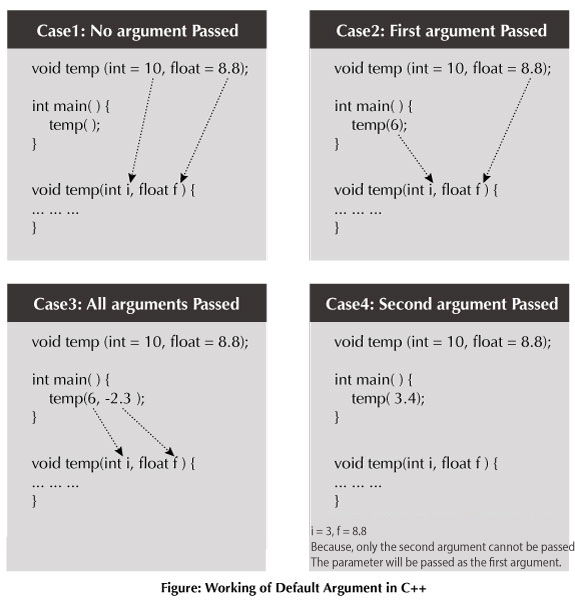
n C++ programming, you can provide default values for function parameters.
The idea behind default argument is simple. If a function is called by passing argument/s, those arguments are used by the function.
But if the argument/s are not passed while invoking a function then, the default values are used.
Default value/s are passed to argument/s in the function prototype.

Working of default arguments

Default arguments in C++

Example: Default Argument

// C++ Program to demonstrate working of default argument

#include <iostream>
using namespace std;

void display(char = '*', int = 1);

int main()
{
    cout << "No argument passed:\n";
    display();
    
    cout << "\nFirst argument passed:\n";
    display('#');
    
    cout << "\nBoth argument passed:\n";
    display('$', 5);

    return 0;
}

void display(char c, int n)
{
    for(int i = 1; i <= n; ++i)
    {
        cout << c;
    }
    cout << endl;
}
Output
No argument passed:
*

First argument passed:
#

Both argument passed:
$$$$$
In the above program, you can see the default value assigned to the arguments void display(char = '*', int = 1);.
At first, display() function is called without passing any arguments. In this case, display()function used both default arguments c = * and n = 1.
Then, only the first argument is passed using the function second time. In this case, function does not use first default value passed. It uses the actual parameter passed as the first argument c = # and takes default value n = 1 as its second argument.
When display() is invoked for the third time passing both arguments, default arguments are not used. So, the value of c = $ and n = 5.

Common mistakes when using Default argument

  1. void add(int a, int b = 3, int c, int d = 4);

    The above function will not compile. You cannot miss a default argument in between two arguments.
    In this case, c should also be assigned a default value.
     
  2. void add(int a, int b = 3, int c, int d);

    The above function will not compile as well. You must provide default values for each argument after b.
    In this case, c and d should also be assigned default values.
    If you want a single default argument, make sure the argument is the last one. void add(int a, int b, int c, int d = 4);
     
  3. No matter how you use default arguments, a function should always be written so that it serves only one purpose.
    If your function does more than one thing or the logic seems too complicated, you can use Function overloading to separate the logic better.

Sunday, October 21, 2018

C++ Function Overloading

Two or more functions having same name but different argument(s) are known as overloaded functions. In this article, you will learn about function overloading with examples.

Function refers to a segment that groups code to perform a specific task.
In C++ programming, two functions can have same name if number and/or type of arguments passed are different.
These functions having different number or type (or both) of parameters are known as overloaded functions. For example:
int test() { }
int test(int a) { }
float test(double a) { }
int test(int a, double b) { }
Here, all 4 functions are overloaded functions because argument(s) passed to these functions are different.
Notice that, the return type of all these 4 functions are not same. Overloaded functions may or may not have different return type but it should have different argument(s).
// Error code
int test(int a) { }
double test(int b){ }
The number and type of arguments passed to these two functions are same even though the return type is different. Hence, the compiler will throw error.

Example 1: Function Overloading

#include <iostream>
using namespace std;

void display(int);
void display(float);
void display(int, float);

int main() {

    int a = 5;
    float b = 5.5;

    display(a);
    display(b);
    display(a, b);

    return 0;
}

void display(int var) {
    cout << "Integer number: " << var << endl;
}

void display(float var) {
    cout << "Float number: " << var << endl;
}

void display(int var1, float var2) {
    cout << "Integer number: " << var1;
    cout << " and float number:" << var2;
}
Output
Integer number: 5
Float number: 5.5
Integer number: 5 and float number: 5.5
Here, the display() function is called three times with different type or number of arguments.
The return type of all these functions are same but it's not necessary.

Example 2: Function Overloading

// Program to compute absolute value
// Works both for integer and float

#include <iostream>
using namespace std;

int absolute(int);
float absolute(float);

int main() {
    int a = -5;
    float b = 5.5;
    
    cout << "Absolute value of " << a << " = " << absolute(a) << endl;
    cout << "Absolute value of " << b << " = " << absolute(b);
    return 0;
}

int absolute(int var) {
     if (var < 0)
         var = -var;
    return var;
}

float absolute(float var){
    if (var < 0.0)
        var = -var;
    return var;
}
Absolute value of -5 = 5
Absolute value of 5.5 = 5.5
In the above example, two functions absolute() are overloaded.
Both functions take single argument. However, one function takes integer as an argument and other takes float as an argument.
When absolute() function is called with integer as an argument, this function is called:
int absolute(int var) {
     if (var < 0)
         var = -var;
    return var;
}
When absolute() function is called with float as an argument, this function is called:
float absolute(float var){
    if (var < 0.0)
        var = -var;
    return var;
}

C++ Function Types

Types of User-defined Functions in C++

In this tutorial, you will learn about different approaches you can take to solve a single problem using functions.
For better understanding of arguments and return in functions, user-defined functions can be categorised as:
  • Function with no argument and no return value
  • Function with no argument but return value
  • Function with argument but no return value
  • Function with argument and return value
Consider a situation in which you have to check prime number. This problem is solved below by making user-defined function in 4 different ways as mentioned above.

Example 1: No arguments passed and no return value

# include <iostream>
using namespace std;

void prime();

int main()
{
    // No argument is passed to prime()
    prime();
    return 0;
}


// Return type of function is void because value is not returned.
void prime()
{

    int num, i, flag = 0;

    cout << "Enter a positive integer enter to check: ";
    cin >> num;

    for(i = 2; i <= num/2; ++i)
    {
        if(num % i == 0)
        {
            flag = 1; 
            break;
        }
    }

    if (flag == 1)
    {
        cout << num << " is not a prime number.";
    }
    else
    {
        cout << num << " is a prime number.";
    }
}
In the above program, prime() is called from the main() with no arguments.
prime() takes the positive number from the user and checks whether the number is a prime number or not.
Since, return type of prime() is void, no value is returned from the function.

Example 2: No arguments passed but a return value

#include <iostream>
using namespace std;

int prime();

int main()
{
    int num, i, flag = 0;

    // No argument is passed to prime()
    num = prime();
    for (i = 2; i <= num/2; ++i)
    {
        if (num%i == 0)
        {
            flag = 1;
            break;
        }
    }

    if (flag == 1)
    {
        cout<<num<<" is not a prime number.";
    }
    else
    {
        cout<<num<<" is a prime number.";
    }
    return 0;
}

// Return type of function is int
int prime()
{
    int n;

    printf("Enter a positive integer to check: ");
    cin >> n;

    return n;
}
In the above program, prime() function is called from the main() with no arguments.
prime() takes a positive integer from the user. Since, return type of the function is an int, it returns the inputted number from the user back to the calling main() function.
Then, whether the number is prime or not is checked in the main() itself and printed onto the screen.

Example 3: Arguments passed but no return value

#include <iostream>
using namespace std;

void prime(int n);

int main()
{
    int num;
    cout << "Enter a positive integer to check: ";
    cin >> num;
    
    // Argument num is passed to the function prime()
    prime(num);
    return 0;
}

// There is no return value to calling function. Hence, return type of function is void. */
void prime(int n)
{
    int i, flag = 0;
    for (i = 2; i <= n/2; ++i)
    {
        if (n%i == 0)
        {
            flag = 1;
            break;
        }
    }

    if (flag == 1)
    {
        cout << n << " is not a prime number.";
    }
    else {
        cout << n << " is a prime number.";
    }
}
In the above program, positive number is first asked from the user which is stored in the variable num.
Then, num is passed to the prime() function where, whether the number is prime or not is checked and printed.
Since, the return type of prime() is a void, no value is returned from the function.

Example 4: Arguments passed and a return value.

#include <iostream>
using namespace std;

int prime(int n);

int main()
{
    int num, flag = 0;
    cout << "Enter positive integer to check: ";
    cin >> num;

    // Argument num is passed to check() function
    flag = prime(num);

    if(flag == 1)
        cout << num << " is not a prime number.";
    else
        cout<< num << " is a prime number.";
    return 0;
}

/* This function returns integer value.  */
int prime(int n)
{
    int i;
    for(i = 2; i <= n/2; ++i)
    {
        if(n % i == 0)
            return 1;
    }

    return 0;
}
In the above program, a positive integer is asked from the user and stored in the variable num.
Then, num is passed to the function prime() where, whether the number is prime or not is checked.
Since, the return type of prime() is an int, 1 or 0 is returned to the main()calling function. If the number is a prime number, 1 is returned. If not, 0 is returned.
Back in the main() function, the returned 1 or 0 is stored in the variable flag, and the corresponding text is printed onto the screen.

Which method is better?

All four programs above gives the same output and all are technically correct program.
There is no hard and fast rule on which method should be chosen.
The particular method is chosen depending upon the situation and how you want to solve a problem.

Popular Posts